My partner is an artist and will often sell her wares at art markets. She had previously mentioned the need to track her merchandise, and it occurred to me that it would be a great real-world application for a small SQLite project.
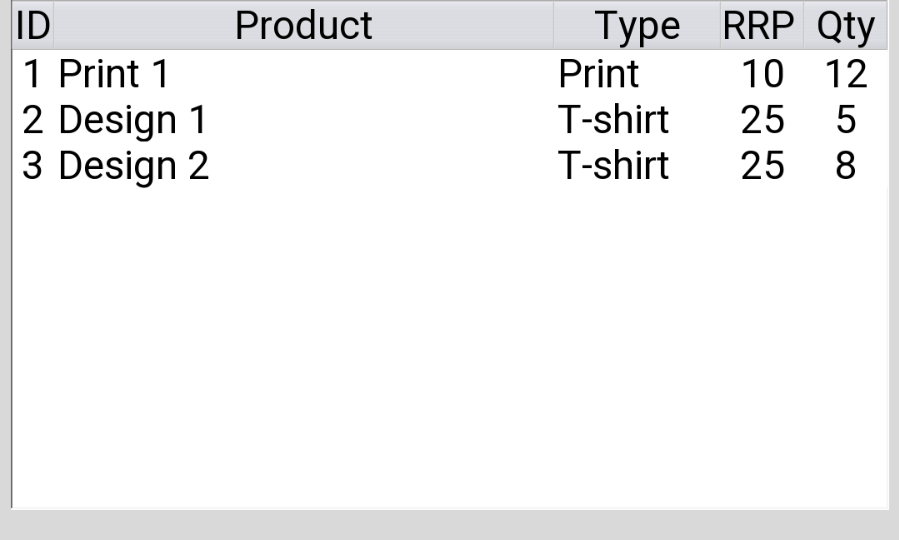
So far, the program connects to an SQLite database, creating a table if one does not already exist and populating it with some sample data if empty. From there, the program reads data from the database and uses it to populate a treeview table which is displayed to the user.
Since this is my first foray into SQLite databases, I aim to keep the application simple, gradually adding features to create a fully functional inventory that can be queried and edited.
Next Steps
Right now, my plan for expanding the app is as follows:
- Add a search function.
- Create the ability to add, edit and delete data entries within the application.
Code review with ChatGPT
I asked ChatGPT* to review my code and suggest areas for improvement. The chatbot highlighted the following:
- Ensure the cursor is reset before fetching data
- Improve database connection handling
- Fix treeview packing & scrolling
- Improve application closing method
- Optional: improve readability with constants
I plan to implement these suggestions alongside my existing next steps to improve my app’s functionality.
Full Code
import tkinter as tk
from tkinter import ttk
from tkinter import messagebox
import sqlite3
# Set up main application class
class InventApp:
	def __init__(self, root):
		self.root = root
		self.root.title("Inventory Application")
		self.root.geometry("600x600")
		# Connect to the SQLite3 database
		self.conn = sqlite3.connect("swfinventory.db")
		self.cur = self.conn.cursor()

		# Create headings array
		self.inventory_headings = ("id", "product", "type", "rrp", "qty")

		# Create table if it doesn't exist
		self.create_table()

		# Create treeview table to display inventory
		self.create_treeview()

		# Load inventory data from database to populate treeview
		self.load_invent()

	# Method to create a table in database and populate with some sample data
	def create_table(self):
		self.cur.execute("""
			CREATE TABLE IF NOT EXISTS inventory(
				id INTEGER PRIMARY KEY,
				product TEXT NOT NULL,
				type TEXT NOT NULL,
				rrp NUMERIC,
				qty INTEGER
			)
		""")

		# Insert sample data if the table is empty
		self.cur.execute("SELECT COUNT(*) FROM inventory")

#		# Delete existing data in database
#		self.cur.execute("DELETE FROM inventory")
		if self.cur.fetchone()[0] == 0:
			sample_data = [
				(1, "Print 1", "Print", 10, 12),
				(2, "Design 1", "T-shirt", 25, 5),
				(3, "Design 2", "T-shirt", 25, 8)
			]
			self.cur.executemany("INSERT INTO inventory VALUES (?, ?, ?, ?, ?)", sample_data)

		self.conn.commit()
	# Method to create treeview to display inventory
	def create_treeview(self):
		style = ttk.Style()
		style.configure("Treeview", rowheight=55)
		self.inventory_tree = ttk.Treeview(self.root, columns=self.inventory_headings, show="headings")

		#Label headings
		self.inventory_tree.heading("id", text="ID")
		self.inventory_tree.heading("product", text="Product")
		self.inventory_tree.heading("type", text="Type")
		self.inventory_tree.heading("rrp", text="RRP £")
		self.inventory_tree.heading("qty", text="Qty")

		# Set column parameters
		self.inventory_tree.column("id", width=50, anchor="center")
		self.inventory_tree.column("product", width=600)
		self.inventory_tree.column("type", width=200)
		self.inventory_tree.column("rrp", width=100, anchor="center")
		self.inventory_tree.column("qty", width=100, anchor="center")
		self.inventory_tree.pack()

	# Method to load data from database and display it in treeview
	def load_invent(self):
		self.cur.execute("SELECT * FROM inventory")
		invent = self.cur.fetchall()

		for item in invent:
			self.inventory_tree.insert("", tk.END, values=item)
	# Method to close the database connection when the application is closed
	def close(self):
		self.conn.close()

# Main function to run the application
if __name__ == "__main__":
    root = tk.Tk()
    app = InventApp(root)
    # Ensure the database connection is closed on exit
    root.protocol("WM_DELETE_WINDOW", app.close)
root.mainloop() Connor Willis
Leave a comment